Resolved
How to transform and enlarge a vector layer
-
VIEW 400
-
Total 5
by
 mutuko14



I'm having trouble transforming objects drawn with a brush on a vector layer.
Previously, I would draw small dots like in the image with a brush, and then transform them later (scale and change orientation).
Recently, I haven't been able to do this, and it's causing me problems.
Using the handles doesn't scale them, and the orientation doesn't change either.
Transforming by selecting an area also doesn't work.
I want to transform them without rasterizing, but I don't know how.
I don't even know if I've changed some setting, or if Clip Studio Paint's specifications have changed.
I would appreciate it if you could tell me what the cause is and how to transform objects on a vector layer.
Thank you.
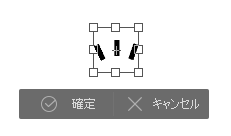
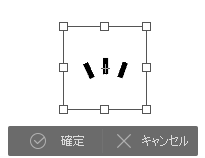
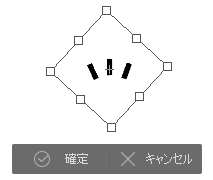
Published date : 4 days ago
Updated date : 4 days ago
Best Answer
-
4 days agoIsn't this just a single stamp-like press of a brush of this shape, rather than three lines being drawn?
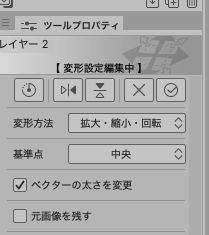
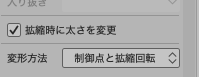
In that case, when you transform it, the "Change vector thickness" option in the tool properties is probably unchecked. Please check it before trying again. (Image 1)
When you want to enlarge it using the object tool instead of Edit → Transform, also check "Change thickness when scaling" in the tool properties. (Image 2)


-



Did you find this helpful?
Open questions in same division

Open

Open

Open

Open

Unanswered questions

Open

Open

Open

Open

Badges
-
 MVP ◆This user has contributed greatly to the management of the community, by posting many great responses to the questions asked. Once every three months, MVPs are determined based on the points earned during that period and will be recognized accordingly.
-
 New Valuable Player (NVP) ◆These are the next-best contributors to the community after MVPs. This is awarded to users who have not yet won an MVP award, based on the number of points they have earned.
-
 Official Expert ◆Chosen out of all MVP awardees, who are already proof of excellence, this is a testimony of outstanding correspondence in the community. After careful screening, they are appointed by CELSYS and assume their position.Note: Formally called “Evangelists”
-
 Official Moderator of CELSYS ◆Moderators are official CELSYS staff members who are fluent in Japanese as well as various other languages. Moderators are not experts on the software or illustration, so they are not able to directly answer your questions. However, moderators provide communication and language support to ensure that everyone can smoothly communicate with each other.
-
 CELSYS official accountThe Official Administrator Account